Dynamic DNS Without the Vendor Lock-In: A Cloudflare Worker for Dual-WAN Omada
Omada's built-in DDNS client only allows one entry per provider per domain — a dealbreaker with two WANs. A small self-hosted Cloudflare Worker speaking the decades-old DynDNS2 protocol fixes it properly.
A dual-WAN router has a problem most dynamic DNS clients were never designed for: it needs to track two independent, changing public IPs, not one. Omada's built-in DDNS client only supports a handful of named providers, and critically, only one entry per (provider, domain) pair — try to add a second entry for the backup WAN and it's rejected outright: “the domain name and service provider of different Dynamic DNS Entries should be different.” Fixing that properly meant stepping outside what the router's UI was built to assume.
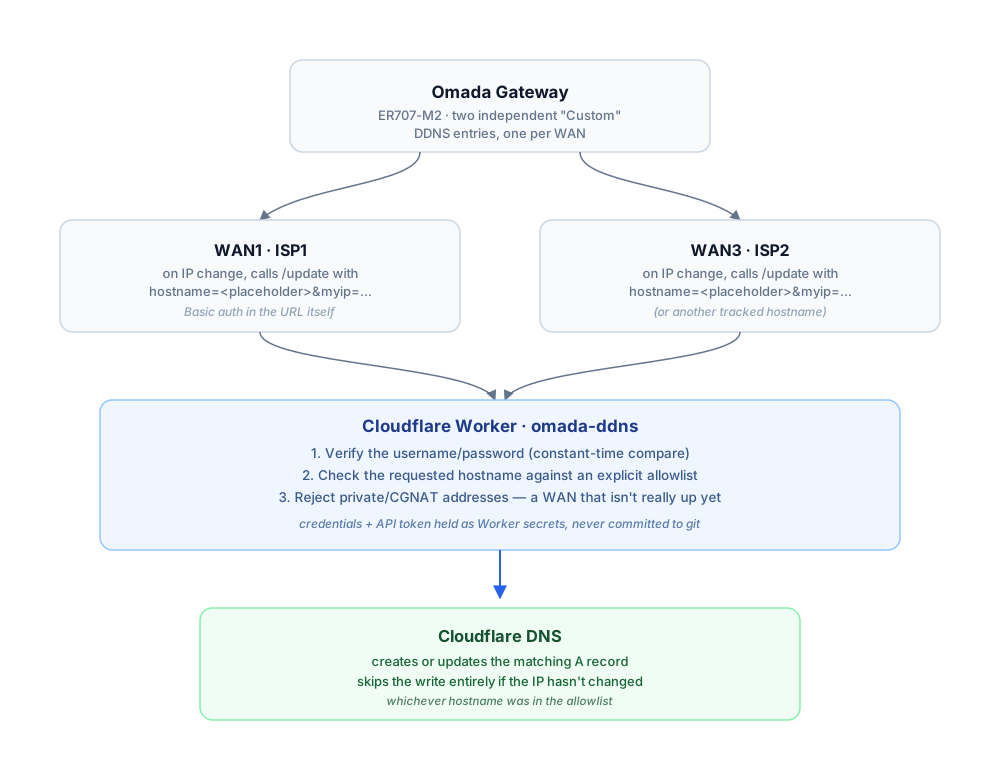
Two WANs, one small Worker, one shared set of rules.
DynDNS2: The De Facto “Custom” Protocol
Almost every router's generic “Custom” DDNS option is really just a DynDNS2 client underneath: a GET request to an /update-style endpoint with a hostname and the current IP as query parameters, authenticated with HTTP Basic auth, answered with a short plaintext status code. Any server that speaks that exact shape can stand in as a Custom provider, regardless of who actually hosts the DNS.
A Worker Instead Of A Server
A Cloudflare Worker is a natural fit for implementing that protocol: nothing to patch, nothing to keep running, and the free tier comfortably covers a couple of update checks per WAN. It also already sits right next to the DNS records it needs to edit, since this domain's authoritative DNS lives on Cloudflare. The entire deployment is one config file and one script.
Three Layers Before Anything Gets Written
Because this endpoint is reachable from the public internet by design, it checks a lot before it touches DNS: the username and password are compared with a constant-time digest comparison rather than a plain string equality, the requested hostname has to appear on an explicit allowlist, and any reported IP that looks private or CGNAT gets rejected outright — a sign the WAN isn't actually up yet, not a real address worth publishing.
const allowed = (env.ALLOWED_HOSTNAMES || "")
  .split(",").map(h => h.trim().toLowerCase()).filter(Boolean);
if (!allowed.includes(hostname)) return text("nohost", 403);

// Reject addresses that would mean the WAN is behind CGNAT / not yet up.
function isPrivate(ip) {
  const [a, b] = ip.split(".").map(Number);
  return a === 0 || a === 10 || a === 127 ||
    (a === 100 && b >= 64 && b <= 127) ||
    (a === 169 && b === 254) ||
    (a === 172 && b >= 16 && b <= 31) ||
    (a === 192 && b === 168);
}
If the current DNS record already matches the reported IP, the Worker skips the Cloudflare API write entirely and just replies nochg — one less API call, and one less noisy change-log entry, on every single poll that didn't actually change anything.
Wiring It Into Omada
Omada gets configured twice — two separate Custom DDNS entries, one per WAN, both pointed at the same Worker URL but with a different hostname in the query string. The “same provider, same domain” collision the router's UI otherwise enforces never triggers, because as far as Omada's own bookkeeping is concerned, the domain lives inside a URL field it doesn't inspect, not in a dedicated per-entry field it checks for duplicates.
What It Unlocked
Both WANs now track their own hostname automatically and independently, with no router firmware update required. One of those hostnames feeds directly into a completely unrelated system — the production VPS's own DNS-based SSH and monitoring firewall — which just keeps re-resolving it every few minutes with zero awareness that a home router and a Cloudflare Worker are what keep it accurate. Two different problems, one small, auditable, 150-line script.