Giving Home Assistant a Brain: LiteLLM, Gemini, and a Smart-Home Gateway
A self-hosted LiteLLM gateway puts Gemini, and a houseful of local models, behind one API — so Home Assistant can ask a real question instead of just firing rigid if-this-then-that rules.
Most Home Assistant automations are rigid by design: a sensor crosses a threshold, a script runs. That's fine for turning on a light, but it falls apart the moment you want something that actually requires understanding language — summarizing the day's events, answering a question conversationally, or reacting sensibly to something open-ended. Getting that capability into Home Assistant, without handing every integration and every automation its own copy of a cloud API key, meant putting a small gateway in front of it.
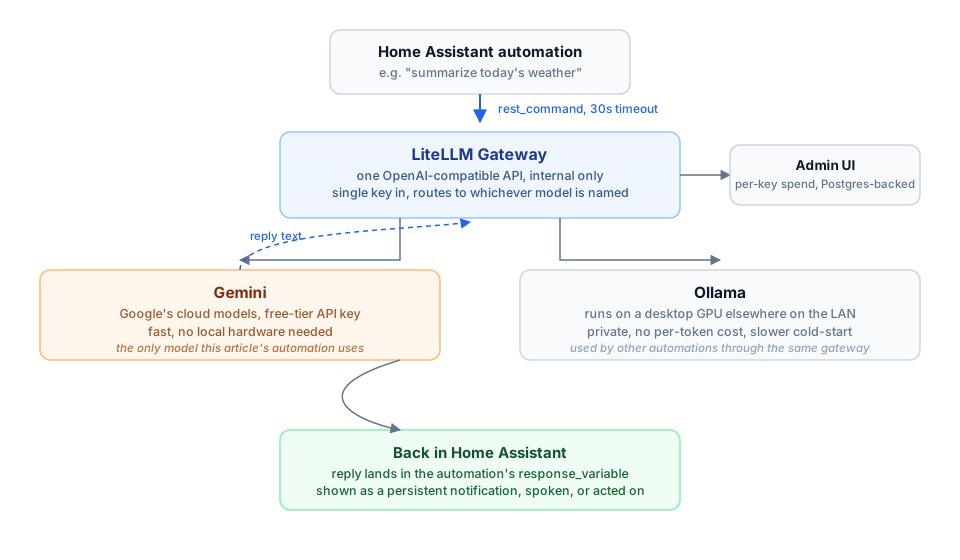
How a request gets from an automation to a model and back.
Why A Gateway, Not A Native Integration
Home Assistant does ship a built-in Google Generative AI integration, and a separate OpenAI conversation integration — but the OpenAI one has no option to point at a self-hosted, OpenAI-compatible endpoint at all; it's hardcoded to talk to OpenAI's own servers. Rather than give every integration and every automation its own Google API key, with no single place to see what's actually being spent or to swap a model later, everything goes through one small internal gateway instead: LiteLLM.
The Gateway
LiteLLM is a lightweight, self-hosted proxy that speaks the standard OpenAI chat-completions API and translates it into whatever a given backend actually expects. It sits at an internal-only address behind a single shared key, and a simple config maps friendly model names to real backends — one name routes to Google's Gemini, a handful of others route to a desktop GPU running Ollama elsewhere on the LAN. Every caller sees the exact same API no matter which backend ends up answering.
Reaching It From Home Assistant
Home Assistant's rest_command feature calls it directly — a plain POST to /v1/chat/completions with a prompt, and the reply text comes back in the response for an automation to use however it likes: a persistent notification, text-to-speech, or feeding straight into another action.
rest_command:
  gemini_ask:
    url: "https://{My AI Gateway}.bschaefer.net/v1/chat/completions"
    method: POST
    timeout: 30
    headers:
      Authorization: "Bearer !secret ai_gateway_authorization"
      Content-Type: "application/json"
    payload: >
      {"model": "gemini-flash", "messages": [{"role": "user", "content": "{{ prompt }}"}]}
One Gotcha
Home Assistant's default rest_command timeout is 10 seconds — too short for a round trip through the gateway to Gemini under any real load. Calls failed intermittently with a bare timeout error that gave no indication anything was actually wrong with the model itself. Bumping the timeout to 30 seconds fixed it completely.
Why The Extra Hop Is Worth It
One URL, one key, one place to see cost and swap models — and an automation ecosystem that can reach either a cloud model or a houseful of local GPU-backed ones without ever knowing the difference. Adding a new backend later means one new line in a config file, not touching every automation that calls it.